The Product Candidate Organization Task This Article Solves When you need to organize candidate products from fashion-reps' foreign trade catalog, the real problem is usually not "can you find the products," but how to save brand, category, color, size, price, and product page into a set of reviewable criteria. This article uses the Foreign Trade catalog page visible on October 21, 2026 as an example to help you complete the process from initial
Editor score 4.2 / 5
The Product Candidate Organization Task This Article Solves
When you need to organize candidate products from fashion-reps' foreign trade catalog, the real problem is usually not "can you find the products," but how to save brand, category, color, size, price, and product page into a set of reviewable criteria. This article uses the Foreign Trade catalog page visible on October 21, 2026 as an example to help you complete the process from initial browsing, criteria filtering, to spreadsheet review.
After reading, you should be able to do three things: first narrow down candidates in a website-based catalog, then build sustainable fields in Google Sheets, and finally go back to the product pages to verify images, specs, links, and update dates.
This article is for users who are comparing clothing candidates, need to record multiple color or size combinations, and need to share the organization results with others. It is not for using the spreadsheet as an order system, nor for confirming material, stock, seller reputation, or final costs solely from catalog cards.

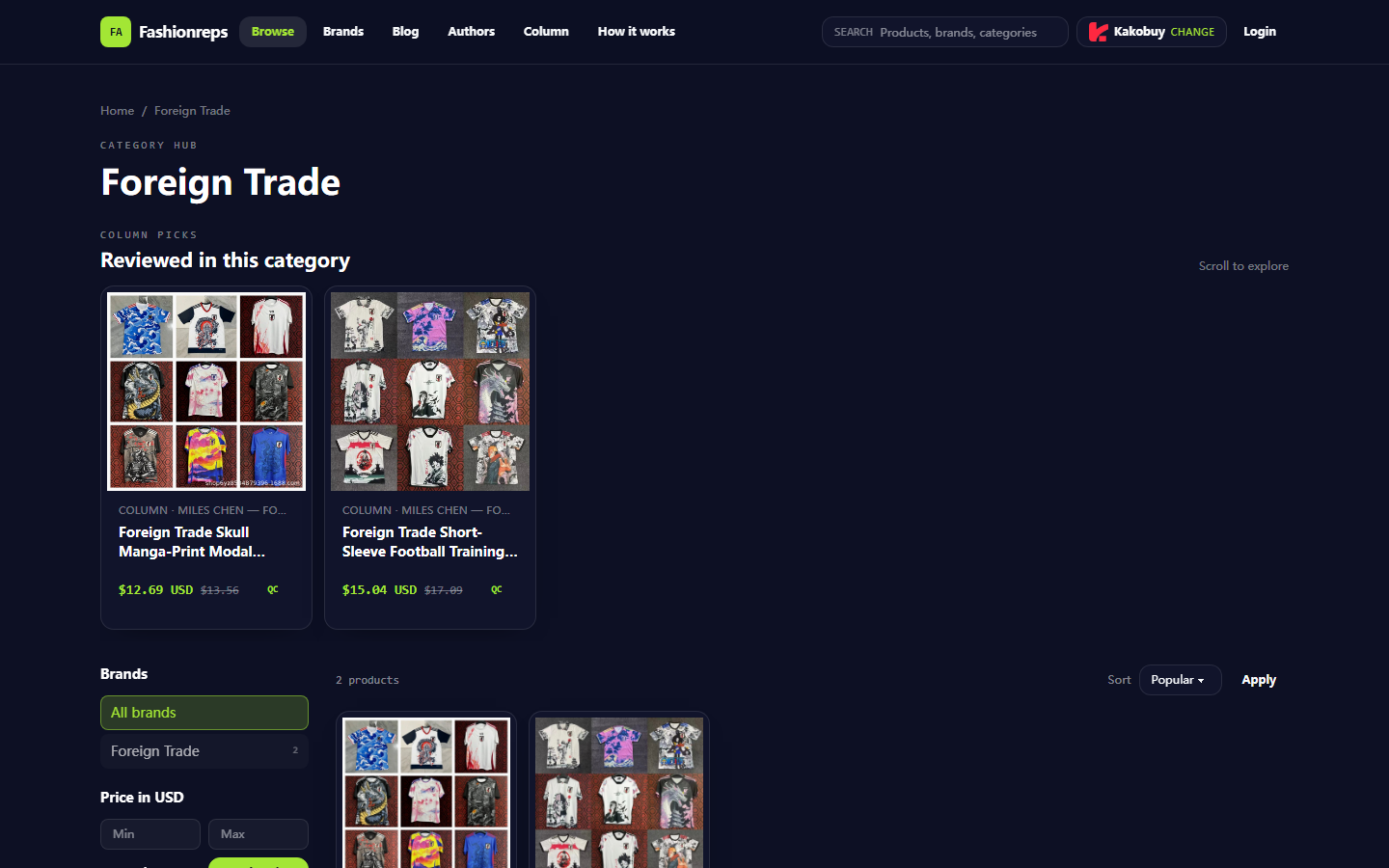
Image: Product cards, brand filters, price filters, and sorting area on the Foreign Trade catalog page.
Catalog, Search, and Product Cards on the Target Website Spreadsheet
Website-based catalogs are better for discovering candidates. The currently visible page uses the Foreign Trade category page as an entry point, including breadcrumb navigation, featured categories, brand filters, USD price ranges, sorting options, and product cards. The page also shows two visible candidates: a Skull Manga-Print Modal Training Set with 55 numbered colors, and a Short-Sleeve Football Training Jersey covering sizes S–3XL with over 40 team colorways.
This information is suitable for answering "which products are worth further viewing," but cannot directly answer "which color is still in stock," "is the size accurate," "does the image correspond to the current link," or "what is the final shipping cost." The reference prices on catalog cards can only serve as a starting point for page verification, not a substitute for the latest costs on the checkout page or product detail page.
When using the catalog, you can follow this order:
- First confirm the breadcrumb and category name to avoid mistaking similar tab pages for the complete product catalog.
- Then select a brand or product collection to reduce irrelevant candidates.
- After that, set a price range, confirm the currency is USD, and record the filter criteria.
- Finally, view results by popularity, newest, or price order, and then open product cards to check details.
🧭 The advantage of the catalog is that it concentrates discovery actions in one page. You can quickly observe product titles, reference prices, color counts, or size ranges, and decide whether it is worth further recording.
Set Up Brand, Category, Color, Size, and Link Columns in Google Sheets
Google Sheets is better for saving filtering results and collaboration information. It is recommended to first create a row of fields, then enter candidates, rather than piling all information into one notes cell.
| Field | Recommended Content | Main Purpose |
|---|---|---|
| Product Title | Full name shown on the page | Distinguish candidates and return to page for verification |
| Brand or Series | Brand, category, or series name visible on page | For brand filtering |
| Category | For example, training wear, jersey, set | For category comparison |
| Color | Color name, number, or colorway count | Check if color requirements are met |
| Size | Size range visible on page | Do a range filter first, then return to details to check size chart |
| Reference Price USD | Price shown on page at the time | For preliminary budget comparison |
| Product Page URL | Original URL of product detail page | Return to page for verification |
| Image Verification | Verified, pending, or inconsistent | Prevent mixing card images with detail images |
| Update Date | Record page verification date | Identify potentially outdated information |
| Notes | Unconfirmed items and next steps | Preserve judgment basis |
In Google Sheets, colors and sizes should use a consistent format. For example, use "Black | White | Red" for colors and "S–3XL" for sizes, and keep the original page text in notes. After standardizing, filtering and searching will be more reliable than mixing commas, slashes, and natural language.
Do not treat "over 40 colorways" as meaning every color is available for purchase. It only indicates the color range displayed on the page; specific options still need to be confirmed by opening the product detail page. 🔎
Use the Same Set of Filter Criteria to Find foreign trade Candidates
To keep catalog browsing and spreadsheet organization consistent, it is recommended to first write a set of actionable criteria:
- Product category: training wear, jersey, or set.
- Price range: record in USD, and note whether it is a reference price or checkout price.
- Size range: for example, need to cover M–XL, or accept S–3XL.
- Color requirements: must be a specific color, or only require a large number of colors.
- Page status: must be able to open the product detail page, and title and main specs visible.
- Verification requirements: product images, sizes, links, and page dates at least checked once.
First filter on the website catalog to quickly discover a candidate set; then enter qualifying products row by row into Google Sheets. When entering, do not just save "qualified" or "not qualified," but record specific reasons, such as "price meets criteria, but size chart pending verification" or "many colors, but target color not confirmed on detail page."
If your goal is to find multi-color products, you can use "color count" as an initial filter field, but do not confuse color count with stock quantity. If your goal is to find specific sizes, prioritize checking the size chart on the detail page, rather than deciding based solely on the range on the card.
Differences Between Website Browsing and Spreadsheet Filtering in the Discovery Phase
The two methods solve different problems. The website catalog is responsible for displaying existing content, while Google Sheets is responsible for saving your judgments.
Website browsing is better for:
- Quickly browsing categories and featured products.
- Observing product cards, cover images, and page titles.
- Using brand, price, and sorting features for a first-round narrowing.
- Opening detail pages of candidate products.
Google Sheets is better for:
- Comparing brand, category, color, and size of multiple products simultaneously.
- Saving pages already viewed to reduce repeated opening.
- Adding statuses such as "pending confirmation," "verified," "not qualified."
- Collaborating with others to divide tasks for organizing, verifying, and updating.
- Preserving different people's work scopes through filter views.
The spreadsheet will not automatically confirm page facts for you. It only filters based on the text you enter. Therefore, the most reliable process is "website discovery, spreadsheet organization, page verification." If you batch copy unverified content into the spreadsheet, the more complete the spreadsheet looks, the harder errors may be to detect. 🧾
Page Verification for Images, Specs, Links, and Update Dates
After candidates are entered into the spreadsheet, you should return to the original product page for a targeted verification. For each candidate, at least check the following:
- Does the product title match the title in the spreadsheet?
- Does the product image actually belong to this product, and not to other products in the category page or recommendation modules?
- Are color names or numbers visible on the detail page?
- Does the size range have a corresponding size chart or specification description?
- Can the product page still be opened, and is it not an empty page, redirect page, or pure tab page?
- Is the reference price still displayed, and is the currency still USD?
- Has the page verification date been written into the spreadsheet?
Images can help you confirm style, print position, and page display, but cannot prove fabric feel, workmanship quality, or exact physical color match. Do not write image observation as personal touch or wearing experience, nor write catalog reference prices as final delivered prices.
If page information changes, keep the old record and note the reason for change in the notes, such as "price page updated," "size range changed," or "original link cannot be opened." This makes it easier to trace the judgment process than directly overwriting old values. 🖼️
Scenarios Suitable for Quick Browsing, In-Depth Organization, and Collaborative Maintenance
For quick browsing, prioritize the website-based catalog. It allows you to start from category, brand, and price entries and quickly determine which products are worth opening. At this stage, you don't need to immediately build a complex spreadsheet, but should at least save the product title and detail page URL.
For in-depth organization, use Google Sheets to build structured fields. Especially when comparing multiple colors, sizes, or price ranges, the spreadsheet can put information scattered across different pages into one view. At this time, add verification status, dates, and pending items.
For collaborative maintenance, the spreadsheet is more valuable. You can agree that one person is responsible for discovering candidates, one person for verifying specs, and another for checking links and update dates. Each person only modifies their own assigned fields, and uses a status column to mark completion, avoiding multiple people overwriting the same record simultaneously.
It is not recommended to rely directly on spreadsheet filtering in the following situations:
- The product detail page has not been opened.
- Colors and sizes are only inferred from the title.
- The price does not indicate currency or verification date.
- The product link comes from unconfirmed copied content.
- Need to confirm stock, shipping, taxes, returns, exchanges, or platform policies.
These issues should be verified by returning to the product detail page, checkout process, or relevant official instructions. fashion-reps' catalog is for discovering products and connecting to external shopping processes; orders, payments, and shipping handling should not be replaced by spreadsheet records.
Saving, Verification, and Next Steps After Combined Use
After initial screening, you can set each candidate's status to "pending detail verification," "specs verified," "link pending recheck," or "not qualified." Only products that have completed checks on title, images, specs, links, and dates are suitable for moving to the next step of purchase research.
It is recommended to save the following minimum records:
- Product title and product page URL.
- Brand, category, color, and size range.
- Reference price displayed on the page and USD currency.
- Verification status for images, specs, and links.
- Most recent page verification date.
- Unconfirmed stock, seller, shipping, taxes, or after-sales matters.
The value of this combination is not to automatically lower prices or guarantee product quality, but to reduce repeated searches and missed verifications. It is suitable for people who need to compare multiple candidates, want to preserve filtering basis, or need to share lists with collaborators.
This organization method is not recommended when you only need to temporarily view one product, do not need to compare multiple conditions, or cannot continuously return to the original page for verification. In such cases, the maintenance cost of a full spreadsheet may outweigh the benefits.
Next, you can first select a small number of candidates, open their detail pages one by one to verify colors, sizes, images, and links, and then mark products that still meet criteria as "specs verified." Before confirming stock, checkout prices, shipping, taxes, and after-sales policies, do not treat the candidate list as a final purchase list. ✅
Nadia Vermeer is Editor-in-Chief at Kakobuytop, running the testing desk, writing agent workflow guides and signing off every score. Nadia personally opens roughly half the parcels that reach the desk, while running its seven-step sequence and maintaining each parcel's master file. Order timestamps, agent replies, QC images, line choice, tracking logs, delivered weight and the score sheet form that record. Every received item is compared with full-size warehouse QC photos before scoring; listing photographs alone do not qualify a product for a score, and articles are held until the parcel arrives.