If you're browsing Amiri items on Fashionreps and can't see selectable sizes, don't rush to add to cart or pay. This issue could be caused by filters, page loading, incomplete item details, or the current product simply not having publicly available size options. This article focuses only on the problem of "missing visible size selection on the product page," aiming to help you verify the page and know when to pause if information is insufficient. 🧭 This article is
Editor score 4.2 / 5
If you're browsing Amiri items on Fashionreps and can't see selectable sizes, don't rush to add to cart or pay. This issue could be caused by filters, page loading, incomplete item details, or the current product simply not having publicly available size options. This article focuses only on the problem of "missing visible size selection on the product page," aiming to help you verify the page and know when to pause if information is insufficient. 🧭
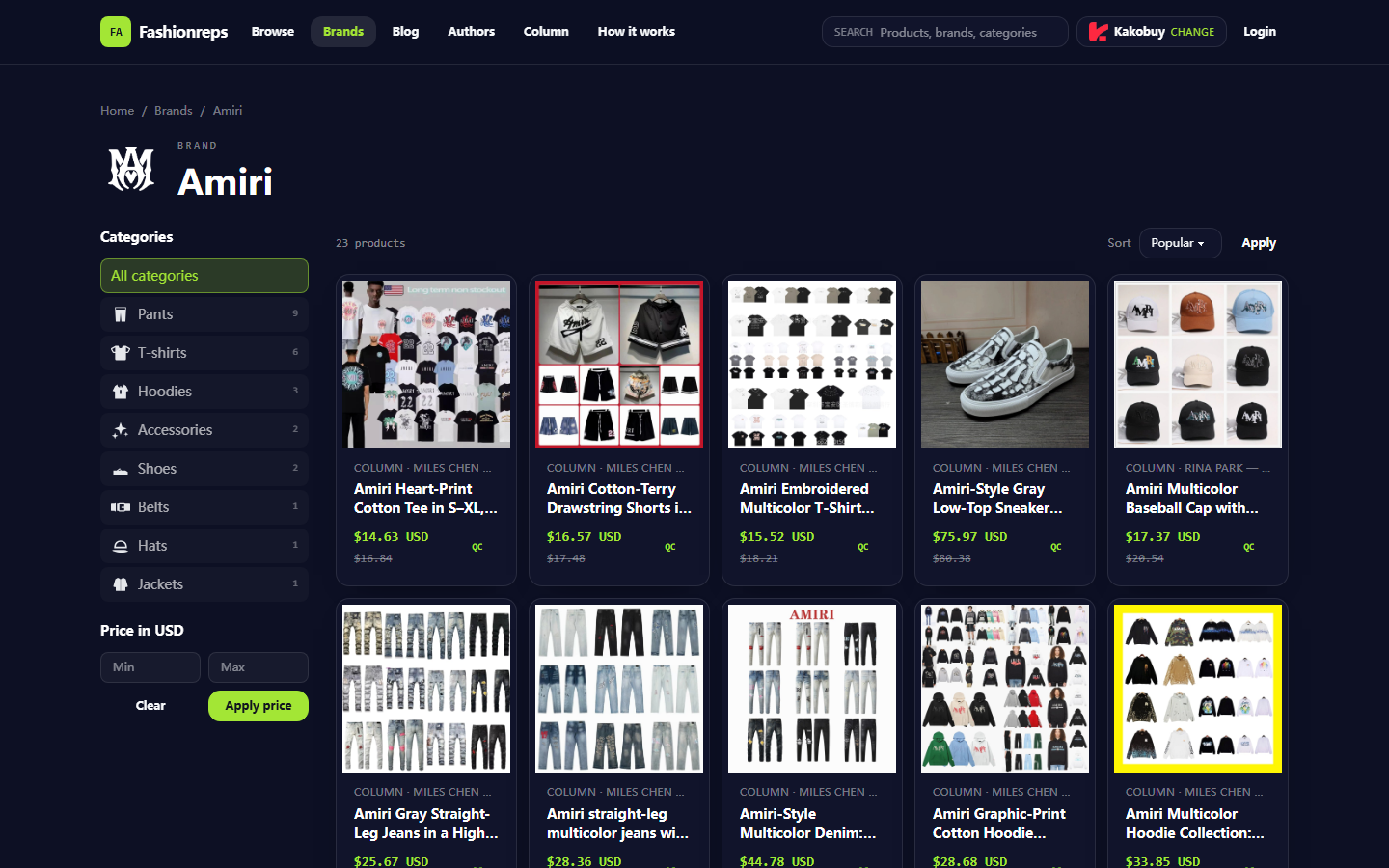
This article is based on screenshots of the Amiri brand catalog visible as of October 20, 2026. The screenshots provide evidence that the brand page has product categories, some item titles, and size descriptions, but they do not prove that every product detail page currently has available sizes, nor do they prove that a specific link has a platform malfunction.

Clarify the Troubleshooting Task for Missing Amiri Size Options on Product Pages
First, confirm the specific issue you're experiencing:
- The product detail page has no size buttons or dropdown options at all.
- The product title says S–XL, S–XXL, or another size range, but the page can't be clicked to select.
- The page has color options but no size options.
- The size area displays blank, fails to load, or keeps spinning.
- After entering the product from the brand catalog, the detail page content is inconsistent with the catalog summary.
After reading this troubleshooting guide, you should be able to do three things: confirm that the current link and style are correct, record the size information actually displayed on the page, and determine whether you can proceed with inquiries, adding to cart, or payment. If the page still cannot confirm a specific size, you should not treat the size range in the title as purchasable inventory. ⚠️
Verify the Product Page, Style, Color, and Current Link Status
First, go back to the Amiri brand catalog and confirm that the product name, category, and images match the target style. The visible catalog includes different items such as T-shirts, shorts, hoodies, jeans, shoes, hats, and jackets, and size rules cannot be applied across categories.
In particular, check the following:
- Whether the product name includes color, print, fit, or material descriptions.
- Whether you are opening a specific product page, not a brand filter page, search results page, or category page.
- Whether the page URL still points to the same product after refreshing.
- Whether the main image, thumbnails, and title correspond to each other.
- Whether the page shows blank sections, error messages, or images that cannot load.
Text like "S–XL" or "S–XXL" in the catalog should only be treated as catalog summary information, not as a substitute for selectable variants, stock status, or the actual size chart on the detail page. The page showing a size range does not mean every size is currently in stock. 📌
Reload the Page and Check Variant Selection and Filter Conditions
Recheck in the following order to avoid misjudging a temporary display issue as a lack of sizes:
- Keep the current product URL and perform a normal refresh.
- If the page is still incomplete, close the current page and re-enter the same product from the Amiri brand catalog.
- Clear any selected color, category, or price filters, then view the product details.
- Wait for the product images, description, and selection area to fully load before judging whether sizes are missing.
- Click through the visible color or style options on the page and observe whether the size area changes with the variant.
- View the page once on a desktop browser and once on mobile, and note whether the two displays are consistent.
If only one color has no sizes while other colors show sizes, this is more likely an issue with incomplete variant data or stock information for that specific variant, and you cannot conclude that the entire product has no sizes. If all variants have no sizes, you should continue to check the description and size chart, and be prepared to seek help from the page provider.
Do not refresh rapidly in succession, and do not repeatedly click the purchase button before the page has fully loaded. This will increase confusion in your judgment and cannot prove that the size data has been updated. 🔄
Record Visible Information by Comparing Product Images, Description, and Size Chart
After opening the product page, record what you can directly see, and do not guess sizes based on image appearance. It is recommended to save the following evidence:
- Product title and page URL.
- Product category and color name.
- All size text displayed on the page, including non-clickable descriptions.
- Whether the product description includes chest, length, waist, inseam, foot length, or other measurement data.
- Whether the size chart corresponds to the current style, not a generic template on the page.
- Whether the page screenshot includes the missing selection area, loading state, or error message.
- Record the time of the screenshot, and cover personal accounts, order numbers, payment information, and other private content.
Images can only help you verify the style, color, and page content; they cannot prove the actual wearing size, fabric feel, or fit effect of the clothing. When there is no size chart, do not choose a size based solely on model photos, flat-lay images, or the size range in the title.
If the page provides garment measurements, distinguish between actual measurements of the garment and recommended body sizes; if it only lists letters like S, M, L without measurements, mark the information as insufficient. 📝
Distinguish Among Temporary Display Glitch, Unmarked Inventory, and Insufficient Page Data
You can organize the results into three judgment levels:
The first is a temporary display glitch. This is when the size buttons appear after refreshing or re-entering, and the rest of the page content loads normally. In this case, rely on the visible state after reloading, and reconfirm that the color and style have not been switched.
The second is unmarked inventory or variants. This is when the product page has color or style options, but some variants have no sizes, or size text exists but is not selectable. In this case, you cannot infer that the unselectable sizes are definitely out of stock, nor can you infer that they can definitely be ordered; you should confirm the current variant status with the page provider.
The third is insufficient page data. This is when there is no size selection, no corresponding size chart, and the description cannot confirm the style or color. In this case, the safest conclusion is "the current page is insufficient to support a size decision," rather than choosing a common size on your own.
Write your conclusion as a verifiable record, for example: "Viewed on October 20, 2026, the page displays the product title and color, but no clickable size was seen, and no measurement chart corresponding to this style was seen." Do not write "the platform must be malfunctioning" or "this product must be out of stock" unless you have direct evidence to support it. ✅
Submit Necessary Page Evidence Through Visible Support Channels on Fashionreps
If after reloading, re-entering, and clearing filters there are still no size options, you should submit the issue through the support, contact, or help channels visible on the Fashionreps page. Keep your submission concise and include the following key points:
- Product name and specific page URL.
- Color or style name.
- Device and browser type you are using.
- Time the issue occurred.
- What the page shows and what is missing.
- Verification steps already completed, such as reloading and re-entering the product page.
- A screenshot of the page with personal information covered.
Do not submit order passwords, full payment card information, passport details, full shipping addresses, or complete shipping labels. Also, do not make a payment or create an order that cannot be canceled just to prove the issue. Fashionreps page states that its role is to help users discover products and go to external shopping agents; orders, payments, and shipping are handled by the chosen agent website. Therefore, if the issue occurs in the agent site's cart, payment page, or stock confirmation, you will also need to consult the site that actually handles that step. 📨
Conditions for Pausing Add to Cart and Payment When Information Is Still Insufficient
Before the following conditions are met, it is recommended to pause adding to cart and payment:
- Unable to confirm the specific style corresponding to the product link.
- Unable to confirm the selected color or variant.
- No clickable size and no size chart corresponding to the current style.
- The page has blank sections, error messages, or a persistent loading state.
- Support channels have not confirmed whether the current variant is purchasable.
- You can only guess the size based on images, model body type, or vague S, M, L text.
The minimum condition to continue is that the product identity, color or style, selectable sizes, and corresponding size basis can all be clearly confirmed on the page or in a support reply. Even if you later transfer to the shopping agent website, you should recheck the product URL, variant, size, and price before payment, because the agent page's inventory and costs may change independently. 💳
The cost of pausing is usually delayed ordering or missing a short-term stock opportunity; the risk of continuing includes buying the wrong style, selecting the wrong size, incurring return and exchange communication costs, or even completing an irreversible payment when uncertain. For products without clear return and exchange conditions, it is even more important to pause when information is insufficient.
Final Pre-Order Checklist for Amiri
Complete the following checklist before deciding whether to proceed:
- [] I have entered the specific product page from the Amiri brand catalog.
- [] I have verified the title, images, category, color, and style.
- [] I have confirmed that the current page is not a brand page, tag page, or search results page.
- [] I have reloaded and re-entered the product page.
- [] I have checked color, style, and other variant options.
- [] I have recorded the size text actually displayed on the page.
- [] I have found a size chart or measurement information corresponding to the current style, or clearly noted its absence.
- [] I have saved page evidence without personal privacy information.
- [] If page data was insufficient, I have consulted via visible support channels.
- [] Before payment, I have rechecked the product URL and variant information on the agent website.
If after completing the checks you still cannot see verifiable size options, the safest outcome is not to guess a size, but to preserve page evidence and wait for a clear reply. This may sacrifice a bit of ordering speed, but it can reduce the risk of size errors and subsequent processing caused by insufficient page data.
Nadia Vermeer is Editor-in-Chief at Kakobuytop, running the testing desk, writing agent workflow guides and signing off every score. Nadia personally opens roughly half the parcels that reach the desk, while running its seven-step sequence and maintaining each parcel's master file. Order timestamps, agent replies, QC images, line choice, tracking logs, delivered weight and the score sheet form that record. Every received item is compared with full-size warehouse QC photos before scoring; listing photographs alone do not qualify a product for a score, and articles are held until the parcel arrives.