When facing a Prada accessories coupon, the real issue is not first finding a tempting discount, but confirming whether the coupon applies to the items you plan to buy, and determining if the final amount due actually drops after checkout. This article is for buyers who have already selected Prada accessories on fashion-reps a
Editor score 4.2 / 5

When facing a Prada accessories coupon, the real issue is not first finding a tempting discount, but confirming whether the coupon applies to the items you plan to buy, and determining if the final amount due actually drops after checkout. This article is for buyers who have already selected Prada accessories on fashion-reps and are ready to enter the ordering process; it is not for those who treat page reference prices, historical prices, or promotional copy without specific rules as confirmed discounts.
The goal here is clear: after completing verification, you should be able to decide to use it immediately, confirm with customer service first, or hold off on checkout. Prices, inventory, coupon status, validity period, service fees, payment methods, and shipping costs may change, so the judgments below should be based on the information displayed on the checkout page on the day of purchase. 🧾
Defining the Single Purchase Decision in Prada Accessories Coupon Verification
First, narrow the question down to one order, rather than vaguely asking "Are there any Prada discounts?" Record the following information:
- The specific item name or item number you plan to buy
- The current amount and currency shown on the item page
- Quantity, color, or specifications
- Whether you plan to buy other items at the same time
- The shopping agent or purchase path used
- Destination country and expected payment method
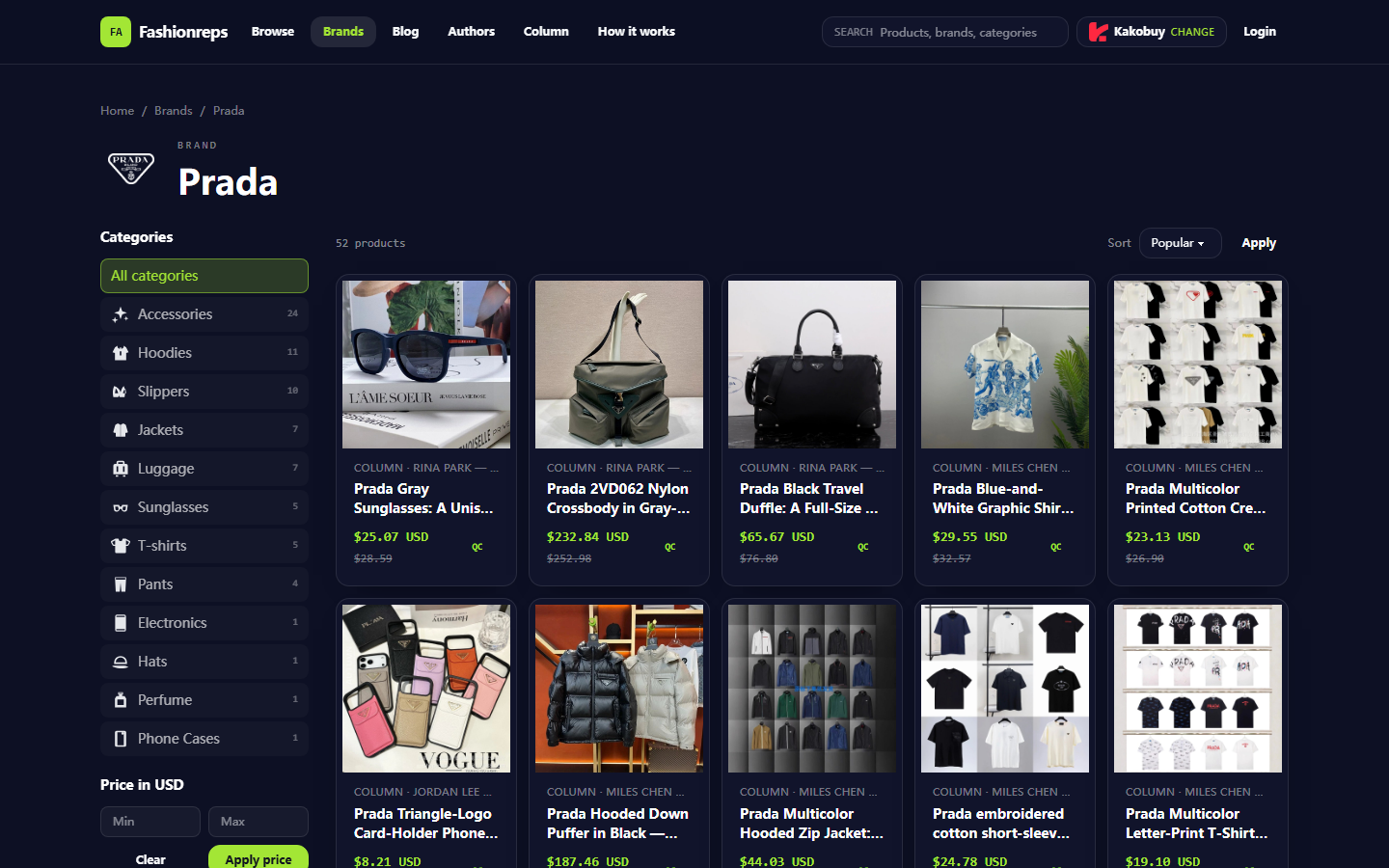
The Prada brand catalog on fashion-reps includes an Accessories category, displaying different types of items such as sunglasses, nylon bags, card holder phone cases, travel bags, and more. The reference amounts shown on the catalog page are only page records, not final transaction prices, and cannot be used to infer that a coupon will definitely apply. During verification, you should enter the purchase process from the actual item page, and avoid treating the brand catalog, tag pages, or old cached pages as the basis for checkout.
Recording Accessory Type, Specifications, and Current Visible Amount from the fashionreps Item Page
After opening the item page, save the key information on the page first, then start researching the coupon. Especially note that items under the same brand may belong to different categories, and coupon rules may exclude specific types, specific sellers, or special-priced items.
It is recommended to record in the following order:
- Item title, item number, or page identifier.
- Accessory type, such as sunglasses, backpack, crossbody bag, handbag, card holder, or travel bag.
- Available colors, sizes, and quantities.
- The current item amount, currency, and whether it shows original price or reference price.
- Whether the page shows discount, limited-time price, price reduction, or other promotional markers.
- Whether the item amount changes after entering the purchase process.
Do not assume the discount is active just because the item title includes "sale," "discount," or historical reference prices. Item price reductions and coupon deductions are two different price changes, and should be recorded separately later.
Finding and Saving the Coupon Rules Displayed on the Target Site
On fashion-reps or the actual purchase agent page, prioritize finding official pages, account coupon center, checkout page prompts, or coupon details pop-ups that clearly state the applicable conditions. Only when specific rules appear can you continue to judge thresholds and exclusions.
You should save or record the following:
- Coupon name or page identifier
- Discount form, such as fixed amount, percentage, or shipping fee reduction
- Minimum purchase amount and its currency
- Applicable site, shopping agent, item category, or seller range
- Excluded items, excluded brands, special-priced items, or service types
- Whether it is limited to new users, specific accounts, or specific payment methods
- Start time, end time, and time zone
- Whether it states that it cannot be combined with other offers
- The basis for calculating the coupon amount at checkout
If the page only shows "claim coupon," "limited-time offer," or "may be available," without amount, validity period, and applicable scope, do not write it down as a confirmed coupon. When there are not enough official rules currently, the correct conclusion is "not yet verified," not to speculate on the discount strength. 🔎
Checking Minimum Purchase, Applicable Items, Exclusions, and Validity Period
The minimum purchase must first be confirmed in terms of calculation caliber. Some rules are calculated based on item subtotal, some may be based on the subtotal of qualifying items, and some may exclude already discounted items, shipping, insurance, or service fees. When the page does not clearly state, you cannot add up all order amounts and assume the threshold is met.
You can use the following verification record:
| Verification Item | Evidence Needed | Handling When Not Displayed |
|---|---|---|
| Minimum purchase | Amount, currency, and calculation scope | Do not assume threshold met |
| Applicable items | Prada accessories category, specific items, or seller range | Confirm with customer service |
| Exclusions | Special-priced items, brands, service fees, shipping, or specified routes | Do not count discount in budget |
| Validity period | Start and end dates, time, and time zone | Consider unconfirmed |
| Account conditions | New user, region, account, or payment method restrictions | Test with current account |
For example, if the order contains sunglasses, bags, and items from other brands, you cannot assume the entire order is calculated under the same rule just because one Prada accessory qualifies. You should check the subtotal of qualifying items separately, and verify whether the coupon allows mixed item use.
Also note that "claim within validity period" and "use within validity period" may be different requirements. If the page only shows the claim deadline, without stating when payment must be completed, you should confirm before checkout, rather than infer based on dates.
Checking the Relationship Between the Coupon and Other Offers, Service Fees, or Payment Methods
The coupon display amount may not equal the final savings. At least four relationships need to be checked:
- Will existing item discounts cancel coupon eligibility.
- Will another coupon or platform promotion be mutually exclusive with the current offer.
- Will service fees, payment processing fees, currency conversion costs, or other order fees not be included in the discount.
- Will a specified payment method change the discount amount or incur additional fees.
If the checkout page offers multiple coupon options, do not just look at discount percentages. Compare the order total before and after use, and confirm whether any fee increases due to changing discount methods. 📌
"Cannot be stacked" should be understood as cannot be used simultaneously, unless the rules explicitly allow item discounts, coupons, and other benefits to stack. Do not interpret multiple promotional markers appearing on the page as meaning they can definitely be combined for deductions.
Verifying on the Order Confirmation Page That the Discount Is Actually Applied
After entering the order confirmation page, complete at least one check without payment. Focus on:
- Whether the item subtotal matches the record from the item page, or whether there is a clear price change.
- Whether the coupon shows as applied, not just available to claim or select.
- Whether the deduction amount, calculation basis, and currency are clear.
- Whether shipping, service fees, insurance, payment processing fees, and taxes are listed separately.
- Whether the final amount due is lower than the comparable amount without the discount.
- Whether the coupon status still shows before submitting the order.
If the coupon disappears immediately after selection, common reasons may include items not qualifying, minimum purchase calculation not matching, account or region restrictions, coupon expired, or coupon conflicting with other promotions. At this time, do not repeatedly submit the order, and do not add unrelated items to "meet the threshold" unless you actually need those items.
It is recommended to save necessary information from the item page, coupon rules, and confirmation page before payment, and cover order numbers, addresses, phone numbers, payment information, and other personal data. Screenshots are only for your own verification records, not substitutes for the platform's final order status.
Marking Conditions Not Displayed, Conflicting, or Needing Customer Service Confirmation
The following situations should be marked as "pending confirmation":
- The rules page does not explain the calculation caliber for minimum purchase.
- The item page shows a price reduction, but the coupon page does not state whether promotional items are excluded.
- The discount amounts shown on the catalog page, coupon center, and checkout page are inconsistent.
- The page does not clearly state the validity period, or the time zone is unclear.
- The coupon is selectable in the cart, but is not deducted on the order confirmation page.
- The rules mention specific accounts, regions, payment methods, or agents, but the current page does not confirm.
- The page has old promotional copy, and it cannot be confirmed whether the current activity is still valid.
When asking customer service, provide the item page, item type, order subtotal, destination country, and the coupon name you currently see, and ask them to clearly answer "whether it applies, how the minimum purchase is calculated, whether it can be stacked, and when it expires." Do not send complete orders, passports, bank cards, or shipping labels with personal addresses.
Using an Evidence Checklist to Decide Whether to Use, Ask, or Hold Off on Checkout
You can handle three outcomes:
- Use: The item meets the applicable scope, the minimum purchase calculation is clear, the coupon is not expired, the checkout page clearly shows the deduction, and the final amount due actually decreases.
- Ask: A coupon prompt appears on the page, but one of the applicable items, stacking relationship, validity period, or fee calculation is still unclear.
- Hold: The coupon does not show specific rules, the checkout page has no actual deduction, or the discount amount cannot be clearly matched to order fees.
When deciding whether it is worth using, calculate the actual savings: the comparable total without the discount, minus the comparable total after using the discount. At the same time, record new risks, including buying unnecessary items to meet the threshold, coupon invalidation, recalculation of discounts after returns or cancellations, and changes in payment or service fees.
This verification method is most suitable for buyers who have already decided to buy a specific Prada accessory, want to reduce the checkout amount, and are willing to check the rules item by item before payment. If you are just browsing, have not decided on a style, or the coupon rules still have only vague promotional language, it is not recommended to increase the order amount in advance to "match the discount." The final decision to use it should be based on the actual display on the purchase day, current account, and current order confirmation page. ✅
Nadia Vermeer is Editor-in-Chief at Kakobuytop, running the testing desk, writing agent workflow guides and signing off every score. Nadia personally opens roughly half the parcels that reach the desk, while running its seven-step sequence and maintaining each parcel's master file. Order timestamps, agent replies, QC images, line choice, tracking logs, delivered weight and the score sheet form that record. Every received item is compared with full-size warehouse QC photos before scoring; listing photographs alone do not qualify a product for a score, and articles are held until the parcel arrives.