If a Vicinity product link opens to a different title, color, size, or spec, don't continue selecting or ordering. Relying solely on the redirected page makes it impossible to tell whether the original link changed, the catalog mapping is incorrect, or the page itself displays a different item. A safer approach is to save both pre- and post-redirect links, page identity fields, and screenshots, then document differences in a spreadsheet until the produc
Editor score 4.2 / 5
If a Vicinity product link opens to a different title, color, size, or spec, don't continue selecting or ordering. Relying solely on the redirected page makes it impossible to tell whether the original link changed, the catalog mapping is incorrect, or the page itself displays a different item. A safer approach is to save both pre- and post-redirect links, page identity fields, and screenshots, then document differences in a spreadsheet until the product identity is confirmed.
First, confirm what the current catalog can prove
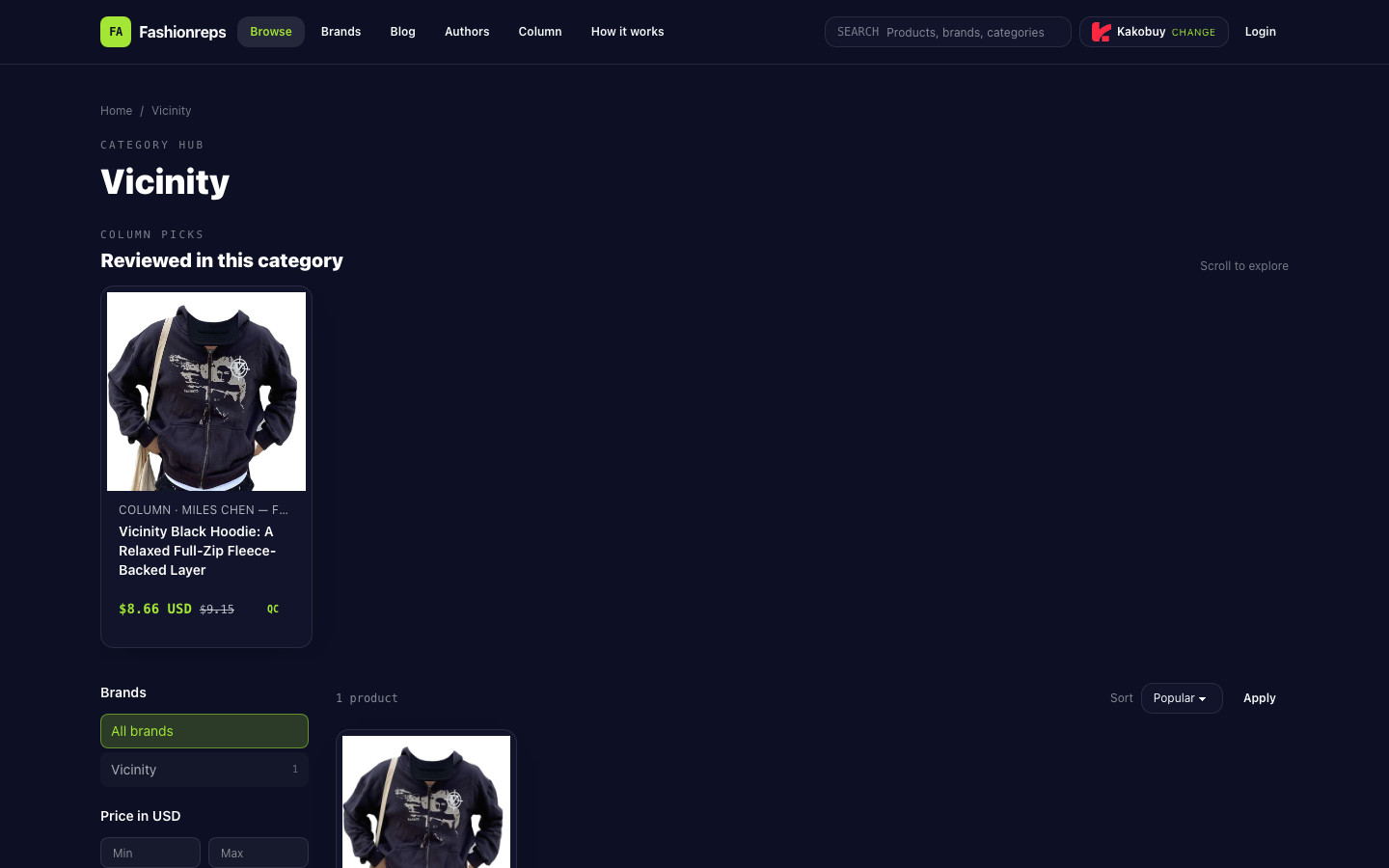
Fashionreps' Vicinity category page appears as a catalog-style page containing the Vicinity category, editor's picks, product titles, reference prices, previous reference prices, and QC filter entry points. The catalog record currently verifiable is "Vicinity Black Hoodie: A Relaxed Full-Zip Fleece-Backed Layer," with a reference price of $8.66 and a previous reference price of $9.15.
This information only proves that a corresponding record exists on the catalog page. It cannot independently prove that the page after the link redirect still shows the same product, nor can it confirm current inventory, shipping, availability, or specific sizes. Since there is no product detail card to cross-check in the current evidence, this catalog record should not be treated as a confirmed purchase recommendation.

Image: Illustration of Vicinity catalog and product field evidence; it does not represent that the redirected page has passed product identity verification.
Step 1: Save evidence before and after the redirect
Before reopening the link, create a record and save at least the following:
- Original link, preserving parameters and path; don't save only the page title.
- Access time, preferably to the minute.
- Visible product name, color, size, style, and image information before the redirect.
- Final link displayed in the browser address bar.
- Title, product images, color, size, price, and other spec fields on the redirected page.
- Screenshot numbering; screenshots should include the address bar or other areas proving page identity.
- Whether the page opens consistently, or shows blank, error, or login prompts.
If the original link comes from the Vicinity category page, save a screenshot of the category page first, then open the product link. This separates the "object seen in the catalog" from the "object after opening the link," preventing you from being left with only an unexplained final page.
Step 2: Verify product identity by field
Don't look only at the product title. Titles may be shortened, translated, or reformatted. You should check at least four types of fields:
- Identity fields: brand or series name, product title, product image, and detail page path.
- Spec fields: color, size, style, version, or set composition.
- Commercial fields: displayed price, currency, and page status.
- Link fields: original URL, final URL, redirect count, and whether it leads to another product path.
Handle as follows:
- Title, image, color, and size all match, only URL parameters changed: mark as "Pending confirmation," continue saving evidence, and don't immediately judge as an error.
- Title similar but image, color, or style different: mark as "Identity mismatch," pause selection.
- Page missing color, size, or key images: mark as "Incomplete fields," pause selection.
- Original link cannot open and final page cannot be reliably reproduced: mark as "Link unreviewable," do not use as a basis for purchase.
- Only reference price changed, other identity fields match: record the price difference, but do not infer inventory, shipping, or final checkout price.
Step 3: Use the website catalog for discovery, Google Sheets for evidence
The Vicinity category page is suitable for discovering and reviewing catalog content. The category navigation, search entry, product cards, sorting options, and QC filters help readers locate records; however, these page interactions may not preserve the history of each visit.
Google Sheets is better for saving the review trail. It allows you to put original link, final link, screenshot number, difference fields, reviewer, and status in the same row, and quickly filter for records marked "Identity mismatch," "Incomplete fields," or "Pending customer service confirmation." It cannot replace the product detail page or prove that a link is currently valid; its purpose is to organize evidence and collaborate on review.
| Tool | Suitable tasks | Conclusions not to draw |
|---|---|---|
| Vicinity catalog page | Browse categories, view catalog titles, reference prices, sorting, and QC filter entry | Cannot confirm the redirected page is the same product based solely on the catalog page, nor confirm inventory and shipping |
| Google Sheets | Save original link, final link, field differences, screenshot numbers, and review status | Spreadsheet records alone cannot replace the real-time status of the product page or purchasing platform |
Suggested columns: original link, access time, catalog title, final title, original color, final color, original size, final size, original image number, final image number, final URL, difference description, status, next step, last review time.
Status values should be fixed. Use these five: "Pending confirmation," "Identity consistent," "Identity mismatch," "Incomplete fields," "Link unreviewable." This prevents mixing "needs customer service confirmation," "hold purchase," and "already confirmed" when filtering.
Step 4: Establish reviewable screenshot numbering
Screenshot filenames should match the numbers in the spreadsheet, e.g.:
- VCY-001-Catalog: saves the Vicinity category page and product record.
- VCY-001-OriginalLink: saves address and page information before opening the original link.
- VCY-001-Redirect: saves address, title, and spec fields of the final page.
- VCY-001-Diff: captures only the area that directly shows title, color, size, or image changes.
Don't screenshot only the product image. Without address, title, or spec fields, it's hard to later prove which page the image came from. Also record error or blank pages if the page cannot be opened reliably, and note the access time.
Step 5: Decide whether to pause selection
Pause selection if any of the following occurs; do not treat the final page as the original product:
- Redirected title clearly points to a different product.
- Image shows color, style, or version inconsistent with the original catalog record.
- Key spec fields disappear, unable to confirm the version to purchase.
- Original and final links cannot be clearly correlated.
- Page opens differently at different times without explainable page status.
- Only a catalog reference price exists, with no detail page or spec evidence.
Even if all core fields match, it's advisable to mark as "Pending confirmation" rather than "Identity consistent" until at least one repeat opening or detail page evidence is obtained. This reduces misjudgment caused by temporary redirects, page caching, and link expiration.
What to submit to customer service
When contacting the target site's customer service, submit complete evidence at once, not just "link is wrong." Include:
- Original and final links.
- Access times for both pages.
- Screenshot numbers for original and redirected pages.
- Specific differences, e.g., "Original record is a black hoodie, but the redirected page does not show the same color field" or "Title and image point to different styles."
- Corresponding record number in Google Sheets.
- Clear request for confirmation: whether the original link still belongs to that product, or whether to pause selection.
Until confirmation is received, do not fill in missing color, size, inventory, shipping, or feature information on your own. The currently verifiable data supports only the catalog fields on the Vicinity category page; it cannot support more specific product detail assertions.
Conclusion
When Vicinity link redirects to different specs, the key is not to immediately judge "the page is wrong," but to break down the product identity before and after the redirect into checkable fields. Use the Vicinity catalog page to save discovery evidence, and Google Sheets to save links, screenshots, and difference statuses; if title, image, or key specs don't correspond, pause selection and submit complete evidence. The currently verified catalog information can only serve as an initial record and cannot replace identity confirmation of the final product page.
Nadia Vermeer is Editor-in-Chief at Kakobuytop, running the testing desk, writing agent workflow guides and signing off every score. Nadia personally opens roughly half the parcels that reach the desk, while running its seven-step sequence and maintaining each parcel's master file. Order timestamps, agent replies, QC images, line choice, tracking logs, delivered weight and the score sheet form that record. Every received item is compared with full-size warehouse QC photos before scoring; listing photographs alone do not qualify a product for a score, and articles are held until the parcel arrives.